
Customers' payments through the Commerce platform can fail for different reasons, ranging from incorrectly entered information to fraud prevention. If a customer's payment fails, their order doesn't register in Squarespace and it won't affect your inventory.
Note: The Payment Activity panel is only available for Stripe transactions. Log into your PayPal Business account to view PayPal payment details. For help, contact PayPal.
Review failed payments
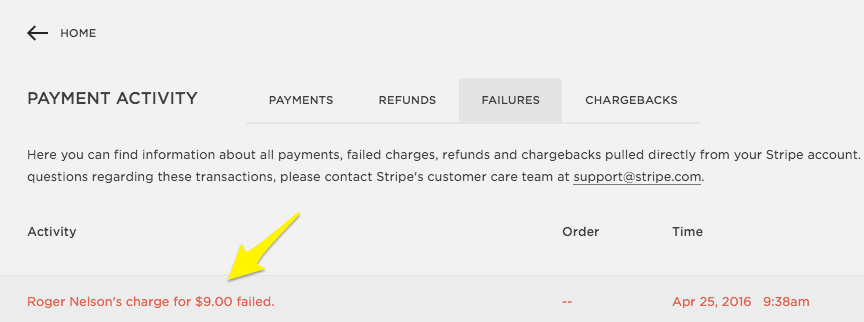
To view a list of failed payments in your Squarespace site, go to Payments, click Stripe, and then click the Failures tab. Click any transaction to view more details in Stripe.
This panel only displays payments that fail or are declined after being sent to Stripe. If a payment fails before a payment event is created in Stripe, it won't appear in the Failures tab. One reason this might happen is if the charge failed because of a network connection issue.
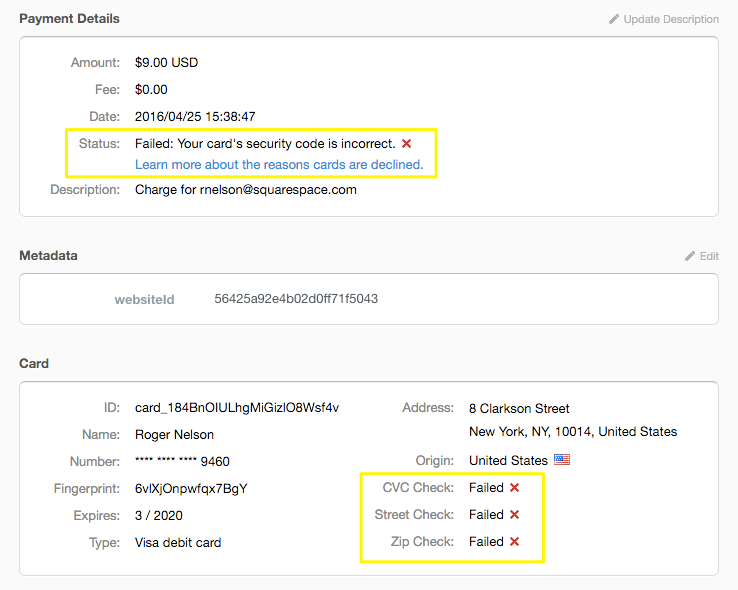
On Stripe's payment activity page, check Status for possible reasons the transaction was declined. You can also scroll down to Card to see which fields triggered the decline. For more help, visit Stripe's documentation.
Failed subscription payments
If you sell subscription products, customers save their payment information and are charged automatically at each renewal. A subscription payment will fail if a customer’s payment details expire.
If this happens, you and the customer will receive an email notification about the failed payment. The customer’s email will include a link to update their billing information.
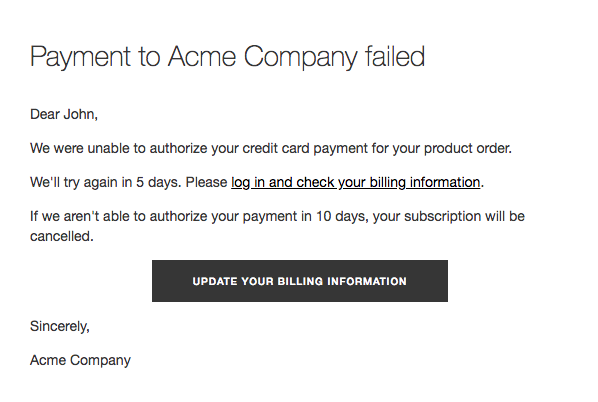
The charge will be attempted two more times over a period of ten days. If it fails three times, the subscription is cancelled.
To learn more about how customers manage their subscriptions, visit Subscription products.
Failed recurring membership fee payments
If you're subscribed to Member Areas, and you have a member area with recurring membership fees, your members are charged automatically for each membership renewal. We treat failed recurring membership fee payments the same as failed subscription payments. If the payment fails three times in ten days, the membership is cancelled and the member loses access to your gated content.
Strong Customer Authentication for European customers
Customers with credit cards issued in the EEA may see an extra authentication step during checkout. While the exact authentication process depends on the customer’s bank, it typically prompts a browser pop-up or push notification from a banking app.
If a customer doesn’t authorize the charge, the transaction will fail. In these cases, ask the customer to try again, ensuring they verify the charge with their bank. You can learn more about Strong Customer Authentication here.
Get help with failed payments
For more help with payment transactions, contact Stripe. As your payment processor, they can provide additional details about issues like failed payments.
Your customer may also want to contact their bank or card provider for further assistance.
Comments
0 comments
Please sign in to leave a comment.